
MacBook or Windows Laptop for College Students?
Choose a MacBook if your classes run on macOS-compatible apps or you already rely on iPhone, iPad, and AirDrop each day; choose a Windows laptop if your program needs Windows-only software, a wider price range, or more ports. Picking the wrong one can mean app problems, extra adapter costs, and a charger you must carry everywhere. This guide compares software needs, battery life, portability, and campus-use value so you can pick the right machine.
Which is better for college: MacBook or Windows?
Start with software, not brand. If your department requires a specific program, that decision comes first; battery life and weight come next; price comes after that. In practice, MacBooks fit students who want long unplugged days and a clean Apple ecosystem, while Windows laptops fit the widest range of majors and budgets.
When the answer is obvious
The choice becomes straightforward when your major names the software. Architecture, engineering, data work, and some business programs may require Windows-only tools or strongly prefer them. On the other side, students who live in Notes, Messages, AirDrop, and iPad study apps often get more convenience from macOS.
When the answer needs a closer check
If your school lists both Mac and Windows support, compare battery, port selection, and total cost of ownership. A thin laptop with about 12 hours of battery matters less if you must carry a charger every day. A cheaper Windows model can cost more later if it needs adapters, a power brick, or a fast replacement.
College laptop decision matrix
This table uses the criteria that actually affect college life: battery, software compatibility, portability, gaming, and total cost of ownership. The recommendation column is the short version. Use it as a filter, then verify your department’s required apps before you buy.
| College use-case | Battery | Software compatibility | Portability | Gaming | Total cost of ownership | Recommendation |
|---|---|---|---|---|---|---|
| General studies | High | High for common student apps | High | Low | Medium | Buy Mac |
| Business | High | Medium to high, check Excel add-ins and school software | High | Low | Medium | Check first |
| Computer science | High | High for many tools, but lab setup matters | High | Low to medium | Medium | Check first |
| Engineering | Medium | Lower risk with Windows-only CAD and lab tools | Medium | Medium to high | Medium | Buy Windows |
| Design | High | Depends on Adobe apps and 3D tools | High | Medium | Medium | Check first |
Software compatibility by major
Software requirements should come before specs or brand loyalty. macOS works well with common student apps and fits students who already rely on iPhone and iPad integration. Windows still supports the broadest range of software, which matters when a department uses niche lab tools, specialty engineering software, or older programs that never moved to macOS.
macOS support for common student apps
For general coursework, macOS usually handles office suites, web tools, note-taking apps, coding editors, and creative software without trouble. Apple also positions macOS around privacy and security, which matters to some buyers. The catch is simple: a good app selection does not guarantee support for every course-specific tool.
Windows-only course software and lab tools
Windows has the edge when a program calls for proprietary lab software, certain CAD packages, or a classroom utility that department tech support expects you to use on Windows. Some engineering and niche business courses are built around that assumption. A Mac can still work in some cases, but only after you confirm the exact app list.
How to verify your department’s required apps before you buy
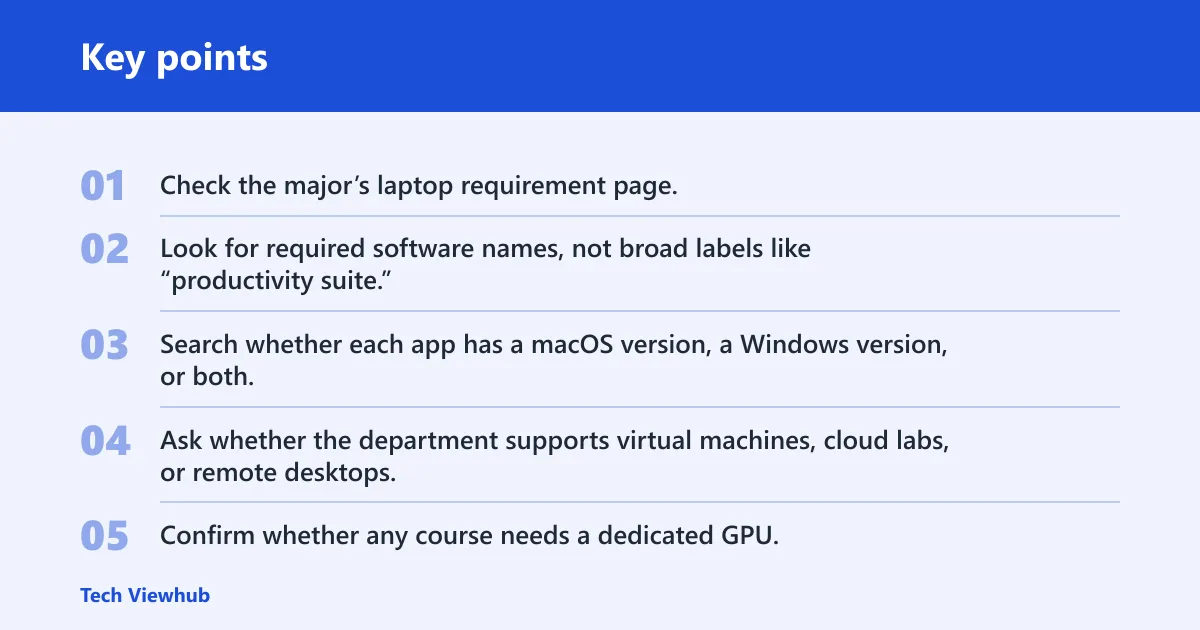
- Check the major’s laptop requirement page.
- Look for required software names, not broad labels like “productivity suite.”
- Search whether each app has a macOS version, a Windows version, or both.
- Ask whether the department supports virtual machines, cloud labs, or remote desktops.
- Confirm whether any course needs a dedicated GPU.
- Buy only after that list is clear.
Say your first year includes a finance class, a data lab, and a writing seminar. The writing app works on both platforms, but the data lab requires a Windows-only package. In that case, a MacBook may create a workaround problem before the semester even starts.
Battery life, portability, and charger carry
Battery life matters on campus, not on a sales page. The question is whether your laptop survives lectures, library time, and a commute without making you hunt for a wall outlet. MacBooks often have the stronger battery life story, while Windows battery life can vary more by model and price.
Why all-day battery matters on campus
College days stretch across classrooms, dining halls, labs, and study spaces. A laptop that starts the day full but needs a midday charge adds friction every single week. For many students, that is more annoying than a small difference in CPU speed or storage size.
MacBook Air vs typical Windows battery spread
MacBook Air is the thin-and-light Apple model aimed at most students, with a focus on battery life and portability. By contrast, Windows laptops range from bargain machines with modest endurance to premium models that do much better. A battery spec on paper tells you less than the day-long pattern of your class schedule.
When a charger becomes part of the daily load
If your laptop cannot last from morning lecture to evening study, the charger becomes a constant extra item in your bag. That matters because campus life already includes books, chargers for a phone, and sometimes a tablet. A lighter laptop loses some of its advantage if it still needs a power brick.
Suppose you have two 50-minute lectures, a three-hour library block, and a long walk back to housing. A MacBook Air may stay out of the charger bag all day, while a cheaper Windows laptop may force a top-up before the last class. That difference shapes how annoying the day feels.
Price, specs, and resale value
Sticker price is only the first line in the math. Total cost of ownership also includes adapters, replacement chargers, repair risk, and resale value after three years. Windows often gives more hardware for the money up front, but MacBooks frequently hold value better when it is time to sell or trade in.
Upfront cost versus total cost of ownership
Apple offers education pricing for college students and educators, which can narrow the gap a bit. Still, a Windows laptop can be cheaper at purchase and may include features such as touchscreen support or more port variety at the same budget. That said, accessory costs can erase part of the savings.
How resale value changes the three-year math
Resale value matters if you plan to replace the laptop after graduation or before it wears out. A higher used value can reduce the real three-year cost, especially for buyers who keep the machine in good condition. That is one reason some students accept a higher MacBook price.
When Windows gives more hardware for the money
Windows laptops span a wider hardware range, from entry-level machines to premium models with touchscreens, larger screens, and dedicated graphics. That range helps if your budget is tight or your class load demands a specific feature. It also means you can avoid paying for Apple features you will not use.
Here is one concrete price signal from the market: TechRadar lists the MacBook Air 15-inch M3 starting at $1,299, while the Microsoft Surface Laptop 7 base price is $999.99. The point is not that one is always a bargain; it is that the Windows market covers more price levels.
Choose MacBook if… / Choose Windows if…

Pick the platform that fits your schoolwork and daily carry, not the logo. A MacBook makes sense for students whose classes run on compatible apps, who want the best chance of all-day battery, and who already depend on Apple devices. A Windows laptop makes more sense when software access, ports, or graphics power matter more.
Choose MacBook if…
- Your major does not require Windows-only software.
- You want a thin-and-light laptop with strong battery life.
- You already use iPhone or iPad features such as AirDrop and shared messages.
- You prefer the MacBook Air for most coursework, or the MacBook Pro for heavier work.
Choose Windows if…
- Your program lists Windows-only apps, CAD tools, or lab software.
- You want a touchscreen laptop or a wider hardware price range.
- You need a dedicated GPU for gaming, 3D work, or some engineering tasks.
- You want more port and configuration choices without relying on adapters.
Choose MacBook Pro when the workload justifies it
The MacBook Pro is the stronger Apple pick for heavier tasks. It comes in 14-inch and 16-inch sizes, includes three Thunderbolt 4 or 5 ports, HDMI, MagSafe 3, SDXC, and a headphone jack, and Apple says it can offer up to 24 hours of battery life. Apple also says M5 is available in 14-inch MacBook Pro models and that M5 versions can have up to 32GB unified memory.
That makes the Pro a better fit for demanding Apple-optimized work, especially when you want more ports and stronger sustained performance. Apple also says the MacBook Pro is built with 100 percent recycled aluminum. For students, the key question is whether those extra features solve an actual class need or just add cost.
Choose Windows for gaming, touchscreen needs, or specialized software
Windows is the safer choice when you need access to the broadest software library or expect to play games on the same machine. It is also the better answer when your course work benefits from a dedicated GPU. CAD, 3D modeling, and some engineering workflows need graphics hardware that many thin laptops do not include.
A common first-timer mistake is buying a sleek laptop for engineering because it looks easy to carry, then discovering that a required simulation tool wants Windows and a discrete graphics chip. The better move is to read the department list first, then choose the machine that fits it.
Frequently asked questions
MacBook vs Windows laptop for college students
For college students, the better choice depends on software first and battery second. MacBooks fit students who want long unplugged days and Apple device integration. Windows laptops fit students who need broader compatibility, more hardware options, or lower entry prices. Your major should decide this before brand preference does.
Should I get a MacBook or Windows laptop for college?
Get a MacBook if your schoolwork runs on macOS-friendly apps and you already use an iPhone or iPad. Get a Windows laptop if your major requires Windows-only software, a touchscreen, or a dedicated GPU. If you are unsure, check the department software list before you spend anything.
MacBook vs Windows laptop for students
Students should compare actual class requirements, not general hype. MacBooks are often the cleaner fit for portability and battery life, while Windows laptops cover a wider software range and budget spread. The best answer depends on whether your courses, lab tools, and daily commute favor one platform.
MacBook vs Windows laptop for college
For college, the better laptop is the one that reduces friction during your day. If you move between classes, library sessions, and group work without a charger, a MacBook often fits that pattern well. If your courses need specific software or graphics hardware, Windows is usually the safer buy.
MacBook vs laptop for college
If by “laptop” you mean Windows, the choice comes down to software and workflow. MacBook Air suits most general college buyers who want battery and portability. Windows laptops win when the course software list is more demanding, when you want more ports, or when price matters more than battery consistency.
Which is better for my college major, Mac or Windows?
For general studies and many business majors, either can work, but you should verify Excel add-ins and school software. For computer science, both can be fine if your course stack supports them. For engineering and some design tracks, Windows is often the safer default because of CAD, lab tools, and GPU needs.